AI Agents
Deploy autonomous AI chatbots to Telegram, Slack, and Email. Give them instructions, memory, and custom tools, without writing code.
Building is free on every plan; testing in the browser and deploying live to Telegram, Slack, or Email require any paid plan. Draft caps are 2 agents on Free, 3 on Pro and Team, and 5 on Business.
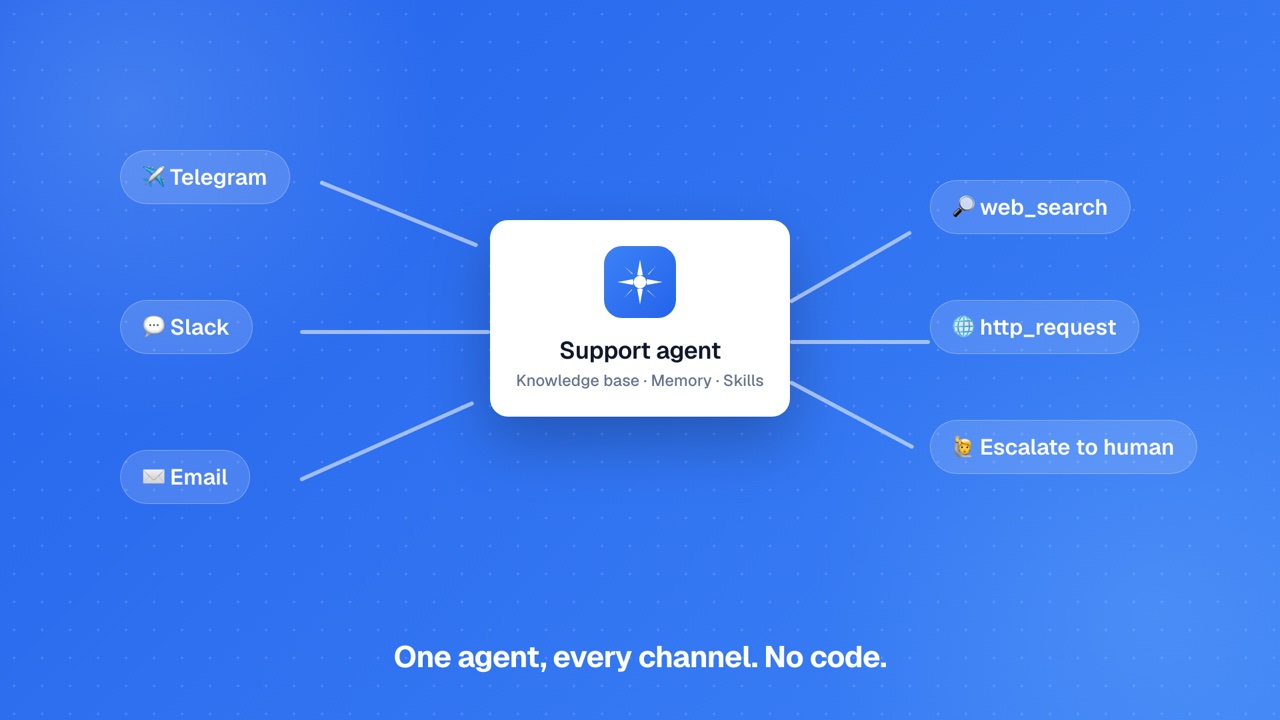
What Agents Can Do
AI Agents are autonomous chatbots that live on messaging channels. They respond to incoming messages, maintain memory of past conversations, use your app's data and skills to answer domain-specific questions, and can send proactive scheduled messages. Think of them as always-on team members that work across Telegram, Slack, and Email.
Create free, test and deploy on any paid plan
You can create and configure AI Agents on every plan (with per-plan caps). Testing an agent in the browser and deploying it live to Telegram, Slack, or Email require any paid plan - Pro, Team, or Business. Ensure your plan is active before configuring channels or deploying.Respond to messages
Receive and reply to messages on Telegram, Slack, or via email with AI-powered responses using your configured personality and instructions.
Follow your instructions
Give the agent a role, tone, boundaries, and values. It follows them on every response, across every channel it is connected to.
Memory
Episodic memory persists facts across conversations. The agent automatically stores and recalls information about users and topics via semantic search.
Scheduled messages
Cron-based proactive messages sent to configured channels at specific times. Supports quiet hours and timezone configuration.
Custom tools
Define HTTP GET/POST endpoints the agent can call. Supports header and body templates with {{variable}} interpolation. Up to 10 custom tools.
Built-in skills
web_search, http_request, current_time, and weather - four skills available out of the box. Enable or disable each per agent.
Human escalation
Detect trigger keywords like "speak to a human" and route to a human. Notifies via email or Slack with the conversation context.
Multi-channel support
Connect multiple channels to a single agent. Separate conversation history is maintained per participant across Telegram, Slack, and Email.
Setting Up an Agent
Creating and deploying an agent takes a few steps. The AI generates a personality and instruction set from your description, you can refine it before deploying.
Create a new agent
Review AI-generated configuration
Connect a channel
Enable skills and tools
Deploy
Start with a focused scope
Agents perform best when given a clear, specific purpose. A customer support agent for a SaaS product with specific instructions and the right tools will outperform a general-purpose assistant with no defined scope.Supported Channels
Agents operate on messaging channels. Each channel has its own configuration requirements. You can connect multiple channels to the same agent, the agent maintains separate conversation history per channel participant.
Telegram
Bot token from @BotFatherCreate a Telegram bot via @BotFather and paste the bot token into your agent's channel settings. The agent responds to any direct message or group mention. Supports text, and can send formatted messages with markdown.
Slack
Channel IDs via OAuthConnect via OAuth and specify which Slack channel IDs the agent monitors and responds in. The agent can both respond to messages and send proactive scheduled messages to configured channels.
Connect a Gmail account for email-based conversations. Optionally configure a trigger email address - messages forwarded to this address are routed to the agent. The agent replies directly to the sender.
Memory
Agents remember what matters across conversations. Memory automatically captures facts from interactions and recalls them the next time the same person gets in touch.
Memory
Memory enables the agent to remember facts across separate conversations. The agent automatically extracts and stores memorable facts during interactions - user preferences, names, past topics, and other relevant details. When a new conversation starts, memories are recalled via semantic search and injected into the agent's context.
| Storage | Up to 100 memories per agent (configurable) |
| Recall method | Semantic search against new conversation context |
| Scope | Per agent - memories are shared across all channels |
| Management | View and delete individual memories from the agent settings |
Memory vs. instructions
Put stable reference content - policies, product facts, tone - in the agent's instructions. Memory handles the dynamic, user-specific facts that emerge during conversations, so it personalizes the response rather than defining it.Skills & Custom Tools
Skills and tools let the agent take action beyond generating text. Built-in skills cover common needs. Custom tools let you connect the agent to your own APIs and services.
Built-in Skills
| Skill | Description |
|---|---|
| web_search | Performs a real-time web search and returns summarized results. Use for questions about current events, live data, or anything outside the agent's own instructions. |
| http_request | Makes an HTTP request to any URL and returns the response. Useful for fetching live API data during a conversation. |
| current_time | Returns the current date and time in any timezone. Useful for scheduling-related conversations. |
| weather | Returns current weather conditions for any location. Requires the location to be specified in the query. |
Custom Tools
Define HTTP endpoints the agent can call during a conversation. Each tool has a name, description (used by the AI to decide when to invoke it), method (GET or POST), URL, optional headers, and an optional body template. Body templates support {{variable}} interpolation from the conversation context.
| Method | GET or POST |
| URL | Any HTTPS endpoint |
| Headers | Key-value pairs (e.g., Authorization: Bearer {{token}}) |
| Body template | JSON template with {{variable}} placeholders |
| Max tools | 10 per agent |
Escalation & Scheduled Tasks
Human Escalation
Configure keywords that trigger a handoff to a human. When the agent detects a configured keyword (e.g., "speak to a human", "urgent", "I need help now"), it sends a configurable escalation message to the user and notifies a human via email or Slack with the full conversation context.
| Trigger keywords | Comma-separated list (e.g., "speak to a human, urgent, talk to support") |
| Escalation message | What the agent tells the user when escalating |
| Notification target | Email address or Slack channel ID to notify |
| Context included | Full conversation history sent with the notification |
Scheduled Tasks
Scheduled tasks let the agent proactively send messages to a configured channel on a cron schedule. Each task has a cron expression, a target channel, and a message template. Quiet hours prevent messages from being sent outside business hours.
| Max tasks | 5 per agent |
| Schedule format | Standard cron expression (e.g., 0 9 * * 1-5 for weekday mornings) |
| Quiet hours | Start time, end time, and timezone - messages are suppressed in this window |
| Target channel | Any connected channel (Telegram, Slack, or Email) |
| Message template | Plain text with optional dynamic content the agent generates at send time |
Use scheduled tasks for daily digests
Scheduled tasks are ideal for recurring updates - daily summaries, weekly reports, or morning briefings sent to a Slack channel. Combine with custom tools to fetch live data at send time.Configuration Reference
Every agent setting and what it controls.
| Setting | Description |
|---|---|
| Display name | The name your agent uses when introducing itself |
| Tone | Personality style: professional, friendly, concise, empathetic, etc. |
| Instructions | System-level instructions defining the agent's role and behavior |
| Boundaries | Topics the agent should not discuss |
| Values | Core principles to reflect in all responses |
| Skills | Enable/disable: web_search, http_request, current_time, weather |
| Custom tools | HTTP GET/POST endpoints with name, description, URL, headers, body template |
| Memory | Enable/disable episodic memory; configure max stored memories |
| Scheduled tasks | Cron expression + target channel + message template (max 5) |
| Quiet hours | Start/end time + timezone for suppressing scheduled messages |
| Escalation keywords | Comma-separated trigger phrases for human handoff |
| Escalation message | What the agent tells the user when escalating |
| Escalation target | Email or Slack channel ID to notify on escalation |
Limits
Agents have usage limits to ensure reliable performance for all accounts.
| Limit | Value |
|---|---|
| Agents per account | 5 active |
| Memory - max entries | 100 (configurable) |
| Scheduled tasks | 5 per agent |
| Built-in skills | 4 (web_search, http_request, current_time, weather) |
| Custom tools | 10 per agent |
| Channels | Telegram, Slack, Email |
| Run model | Long-running GKE pod, no per-request timeout |
FAQs
What is an AI Agent?▾
How is an agent different from a regular app?▾
Can the agent remember past conversations?▾
Can the agent send proactive messages?▾
What built-in skills does the agent have?▾
What is escalation?▾
Ready to build?
Create your first app for free, no credit card required.